rusterize in Python
rusterize is designed to work on all shapely geometries, even when they are nested inside complex geometry collections. Functionally, it supports four input types:
- geopandas GeoDataFrame and GeoSeries
- polars-st GeoDataFrame
- Python list of geometries in shapely.Geometry, WKB, or WKT format
- Numpy array of geometries in shapely.Geometry, WKB, or WKT format
It returns a xarray, a numpy, or a custom sparse array in COOrdinate format.
Installation
rusterize comes with numpy as the only required dependency and is distributed in different flavors. A core library that performs the rasterization and returns
a bare numpy array, a xarray flavor that returns a georeferenced xarray (requires xarray and rioxarray and is the recommended flavor), or an all flavor with
dependencies for all supported inputs.
Install the current version with pip:
# core library
pip install rusterize

# xarray capabilities
pip install 'rusterize[xarray]'

# support all input types
pip install 'rusterize[all]'
Usage
Visit the full API reference.
from rusterize import rusterize
import geopandas as gpd
from shapely import wkt
import matplotlib.pyplot as plt

# construct geometries
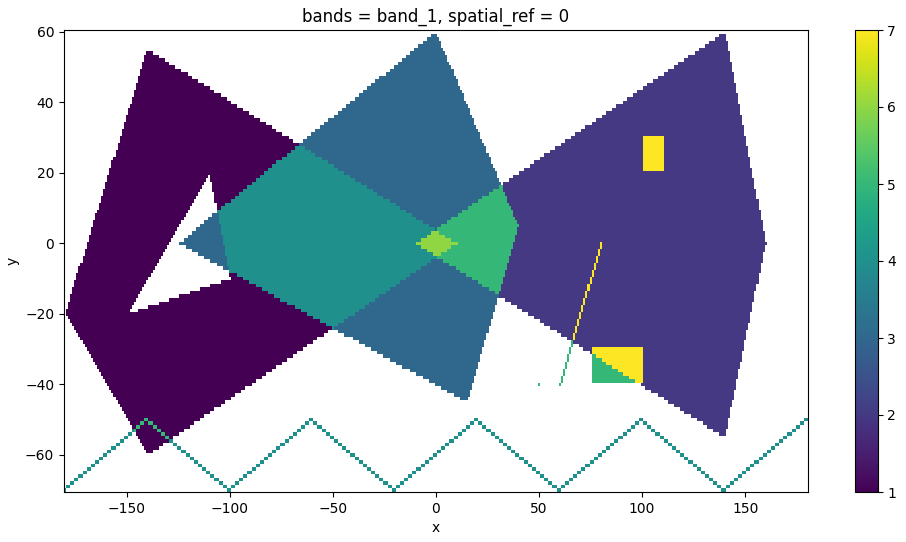
geoms = [
    "POLYGON ((-180 -20, -140 55, 10 0, -140 -60, -180 -20), (-150 -20, -100 -10, -110 20, -150 -20))",
    "POLYGON ((-10 0, 140 60, 160 0, 140 -55, -10 0))",
    "POLYGON ((-125 0, 0 60, 40 5, 15 -45, -125 0))",
    "MULTILINESTRING ((-180 -70, -140 -50), (-140 -50, -100 -70), (-100 -70, -60 -50), (-60 -50, -20 -70), (-20 -70, 20 -50), (20 -50, 60 -70), (60 -70, 100 -50), (100 -50, 140 -70), (140 -70, 180 -50))",
    "GEOMETRYCOLLECTION (POINT (50 -40), POLYGON ((75 -40, 75 -30, 100 -30, 100 -40, 75 -40)), LINESTRING (60 -40, 80 0), GEOMETRYCOLLECTION (POLYGON ((100 20, 100 30, 110 30, 110 20, 100 20))))"
]

# create a GeoDataFrame with shapely geometries from WKT
gdf = gpd.GeoDataFrame({'value': range(1, len(geoms) + 1)}, geometry=wkt.loads(geoms), crs='EPSG:32619')

output = rusterize(
    gdf,
    res=(1, 1),
    field="value",
    fun="sum",
).squeeze()

# plot it
fig, ax = plt.subplots(figsize=(12, 6))
output.plot.imshow(ax=ax)
plt.show()
You could also create a multiband output by specifing the by parameter.
gdf["by"] = ["a", "a", "b", "b", "c"]

output = rusterize(
    gdf,
    res=(1, 1),
    field="value",
    by="by",
    fun="sum",
)
Alternatively, you can pass raw values to burn on the final raster, one per geometry.
import numpy as np

output = rusterize(
    geoms,
    res=(1, 1),
    fun="sum",
    burn=np.arange(1, len(geoms) + 1)
).squeeze()
Finally, you can also create a SparseArray, that is an object storing the band/row/col value triplets of all pixels that will be materialized in a final raster.
output = rusterize(
    gdf,
    res=(1, 1),
    field="value",
    fun="sum",
    encoding="sparse"
)
output
# SparseArray:
# - Shape: (131, 361)
# - Extent: (-180.5, -70.5, 180.5, 60.5)
# - Resolution: (1.0, 1.0)
# - EPSG: 32619
# - Estimated size: 378.33 KB

# materialize into xarray or numpy
array = output.to_xarray()
array = output.to_numpy()

# get only coordinates and values
output.to_frame()
# shape: (29_363, 3)
# ┌─────┬─────┬────────┐
# │ row ┆ col ┆ values │
# │ --- ┆ --- ┆ ---    │
# │ u64 ┆ u64 ┆ f64    │
# ╞═════╪═════╪════════╡
# │ 6   ┆ 40  ┆ 1.0    │
# │ 6   ┆ 41  ┆ 1.0    │
# │ 6   ┆ 42  ┆ 1.0    │
# │ 7   ┆ 39  ┆ 1.0    │
# │ 7   ┆ 40  ┆ 1.0    │
# │ …   ┆ …   ┆ …      │
# │ 39  ┆ 286 ┆ 5.0    │
# │ 39  ┆ 287 ┆ 5.0    │
# │ 39  ┆ 288 ┆ 5.0    │
# │ 39  ┆ 289 ┆ 5.0    │
# │ 39  ┆ 290 ┆ 5.0    │
# └─────┴─────┴────────┘
Benchmarks
rusterize is fast! Let’s try it on small and large datasets in comparison to GDAL (benchmark_rusterize.py). You can run this with pytest and pytest-benchmark:
pytest <python_file> --benchmark-min-rounds=10 --benchmark-time-unit='s'

--------------------------------------------------- benchmark: 8 tests ----------------------------------------------------
Name (time in s)                  Min      Max     Mean   StdDev   Median      IQR Outliers       OPS   Rounds   Iterations
---------------------------------------------------------------------------------------------------------------------------
test_water_small_f64_numpy     0.0035   0.0043   0.0036   0.0001   0.0035   0.0002    34;1   279.6455      196            1
test_water_small_f64           0.0043   0.0057   0.0045   0.0002   0.0044   0.0003    19;4   221.4534      170            1
test_water_small_gdal_f64      0.0050   0.0053   0.0050   0.0001   0.0050   0.0000   14;13   198.2172      169            1
test_water_large_f64_numpy     1.1843   1.2668   1.2302   0.0263   1.2288   0.0322     4;0     0.8128       10            1
test_water_large_f64           1.1843   1.2516   1.2270   0.0206   1.2270   0.0272     3;0     0.8150       10            1
test_water_large_gdal_f64      1.2955   1.3051   1.3009   0.0031   1.3015   0.0041     3;0     0.7687       10            1
test_roads_uint8               1.9457   2.0719   1.9922   0.0390   1.9876   0.0486     3;0     0.5019       10            1
test_roads_gdal_uint8          4.7064   4.7561   4.7278   0.0161   4.7214   0.0265     3;0     0.2115       10            1
----------------------------------------------------------------------------------------------------------------------------
Comparison with other tools
While rusterize is fast, there are other fast alternatives out there, including rasterio and geocube. However, rusterize allows for a seamless,
Rust-native processing with similar or lower memory footprint that does not require you to install GDAL and returns the geoinformation you need for downstream
processing with ample control over resolution, shape, extent, data type, and encoding.
The following is a time comparison of 10 runs (median) on the same large water bodies dataset used earlier (dtype is float64) (run_others.py).
rusterize: 1.2 sec
rasterio:  14.5 sec
geocube:   124.9 sec